


Propel EBT & SNAP Benefits
4.8121.13K Reviews
App Specs
- Version
- 9.1.0
- Updated On
- License
- Free
- Downloads
- 10,000,000+
- Developer
- Propel Inc
- Categories
- Finance
- Platform
- Android, iOS
Screenshots
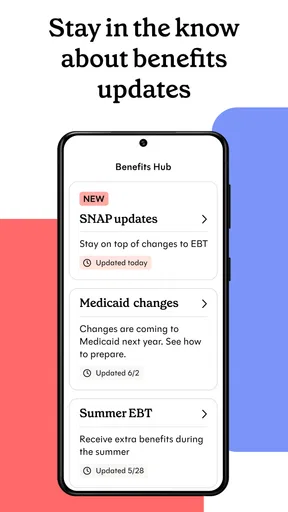
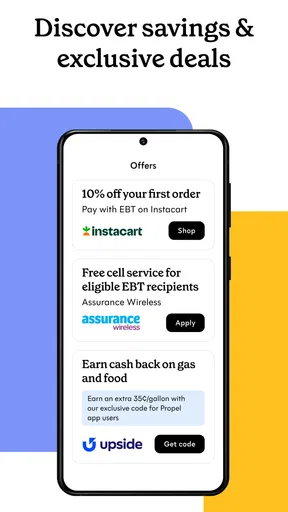
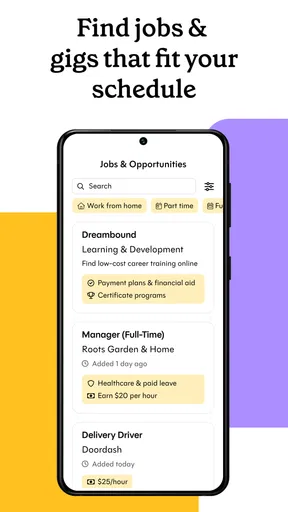
 Analysis by AppCompare
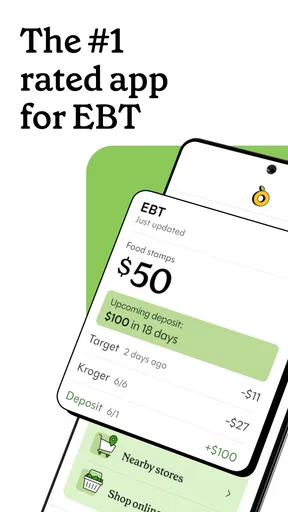
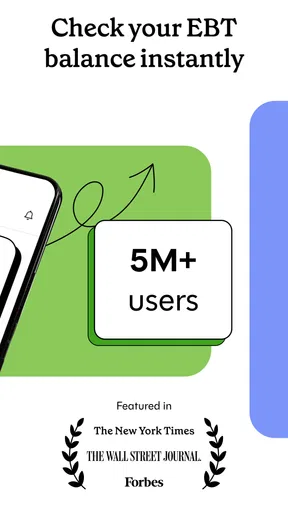
When I’m planning food shopping around benefits, the most useful thing an app can do is make a balance easier to check before I reach the checkout. Propel EBT & SNAP Benefits is a finance app from Propel Inc for people who use EBT, SNAP or WIC. I see its strongest role as a practical companion for keeping benefit information close at hand—not as a replacement for a state benefits office or a complete household budget. It’s free, rated for Everyone, and has a 4.8 average from around 675,000 ratings, which suggests that many people find this kind of everyday access worthwhile.
Quick checks are the app’s main performance test
For this kind of tool, speed matters most at ordinary decision points: checking a balance before leaving home, confirming available funds while making a list, or taking a last look before paying. I would judge it less by flashy screens than by whether the information I need is easy to reach. Propel’s purpose is focused, and that focus is a practical advantage over opening a general money-management app and trying to make it fit benefits.
There is an important distinction between an app opening quickly and benefit information being current. A balance depends on account information becoming available, so I would not treat a screen as a guarantee that a purchase will clear. If I were close to my limit, I’d check before shopping and leave a little room for a price change or an item that rings up differently than expected. That cautious habit is useful with any balance-checking tool, not a reason to assume the app has failed.
Useful under shopping pressure, with sensible limits
The more demanding moments are not necessarily heavy use in the technical sense. They are the situations where a quick answer matters: a busy shop, a low phone battery, an unreliable connection, or several errands competing for attention. I’d use Propel to prepare at home when possible, then rely on it as a handy reference while out. A written shopping list and a mental estimate of the total still matter; the app can support those habits, but it cannot make decisions about what a household can afford.
A small workflow makes the app more useful: check the balance before building the final list, separate essentials from items you can postpone, and avoid spending right down to the displayed amount. If a purchase is declined or a balance looks unexpected, pause and use the official route for resolving account questions rather than repeatedly refreshing an app. That distinction helps keep a moment of checkout stress from turning into an assumption that a display or transaction has settled everything.
Reliability means knowing what to use it for
Propel is best understood as a convenience layer for benefit management. I would use it to get a clearer view of my day-to-day planning, while keeping official state channels in mind for account changes, eligibility questions, or a problem that needs an authoritative answer. That is a useful boundary: a third-party app can make routine checks easier, but important benefit decisions should be confirmed through the relevant program.
For a realistic example, imagine planning a grocery trip after work. I’d check the available balance before heading out, make a list that prioritizes the meals I need to cover, and use the nearby-store information to choose a practical destination. If an offer or discount catches my eye, I’d treat it as a possible saving rather than a reason to buy something I had not planned for. The benefit is not just seeing information; it is having a moment to make a calmer choice before standing at the register.
Worth Reading Before You Choose

EA SPORTS FC Mobile 26 Is a Bigger Football Game, but It Takes Time

Flipboard Shows What News Apps Must Do Beyond the Feed

Switching to Android Auto Means Rethinking Your Driving Routine

Google Calendar Makes a Crowded Week Easier to Manage

Ludo King Makes the Most of the Minutes Between Plans

Baby Panda World Brings Quick Play to Modern Phones, but Its Game Library Feels Busy
Getting Started with Propel
First things first, downloading the app was a breeze. Available on both Android and iOS, Propel EBT & SNAP Benefits doesn’t take up much space on your device. Once installed, setting it up was straightforward. You just need to enter your state and EBT card number. The app then syncs with your account, giving you detailed access to your balance and recent transactions.
That setup is also the point where I’d slow down and check that I’m entering information carefully, especially if I’m helping a family member. Benefits are personal, and using a phone that other people can access calls for basic care: use the device’s normal screen lock and avoid leaving account details visible. If you are setting it up for someone else, make sure they understand which information is being entered and that they remain in control of their account.
The app is a better fit for people who routinely need a convenient view of food benefits than for someone who only wants a broad household-finance dashboard. A general budgeting app may be a better choice for tracking rent, bills, bank accounts, and savings in one place. Propel’s appeal is its narrower focus on benefit-related tasks. That focus can save effort, but it should not be mistaken for a complete picture of every source of income or every household expense.
Features That Make Life Easier
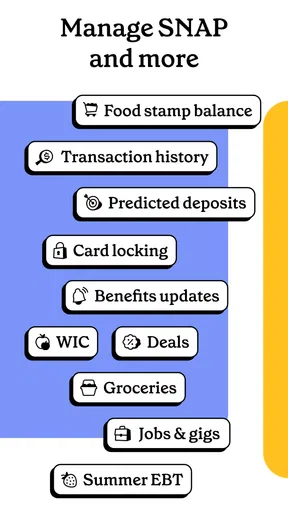
One of the coolest features I found was the budgeting tool. It’s almost like having a financial coach cheering you on. The app provides insights on your spending, helping you manage your benefits more effectively. Plus, it sends notifications about your balance and any changes, so you’re always in the loop.
I’d use those tools as prompts for planning, not as instructions to spend more or as a promise that a particular notification will arrive at the exact moment I need it. A useful routine is to review spending after a shopping trip and adjust the next list, rather than trying to remember every purchase later. This is especially helpful when a household shops in several smaller trips: looking at the pattern can make it easier to reserve enough for the rest of the week.
Another handy feature is the ability to find stores nearby that accept EBT. No more guessing games or awkward moments at the checkout. You can also see weekly discounts and deals from local grocery stores, which is a neat way to stretch those benefits a bit further.
For store information and deals, I’d still verify the details that matter before making a special trip. A nearby listing can help narrow down options, but hours, item availability, and whether a particular purchase qualifies are separate questions. The most practical use is to shortlist a convenient store, check the offer against a shopping list, and avoid building a trip around a deal that is not relevant to what you actually need.
That approach also helps explain who may want to skip the app. If you do not use EBT, SNAP, or WIC, its central purpose may not match your needs. If you need a definitive answer about a case, a card problem, or program rules, an official benefits service is the more appropriate place to turn. Propel is most helpful for routine access and planning between those more formal interactions.
User Experience and Interface
The user interface is clean and intuitive. Even if you’re not tech-savvy, navigating through the app feels natural. Everything is laid out clearly, and there’s a helpful FAQ section if you ever get stuck.
Propel has been around since December 24, 2015, and its current version is 8.10.0. It has over 10 million installs, a sign that it is widely used, though popularity alone cannot tell me how it will behave on every phone or in every location. The minimum Android requirement is 6.0, which makes it relevant to some older devices, but the experience still depends on a phone having enough working space and a dependable way to connect when current account information is needed.
If the app feels slow during a particular check, I would first separate a local phone issue from an account or network delay. Closing other demanding apps, checking the connection, and trying again later are reasonable first steps; for a time-sensitive transaction, I would not rely on repeated refreshes as proof of the available balance. Keeping the app updated can also help avoid using an older build, though no app can remove every delay caused outside the phone.
On a device shared with children or other household members, I’d be thoughtful about where the app is left open and who can see notifications. That is a practical device-use consideration, not a claim about a special security setting. Similarly, a person with limited data or an older phone may prefer to do planning at home and use the app only when needed, rather than keeping several shopping and finance apps active at once.
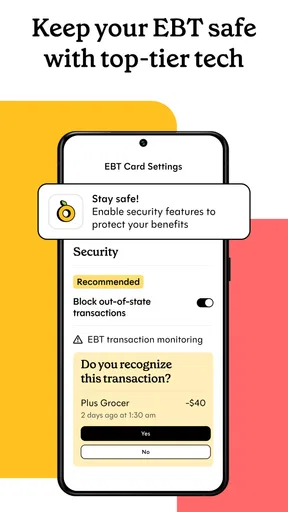
One thing I really appreciated was how the app respects user privacy. Your personal information is securely encrypted, giving you peace of mind while using it. Safety first, right?
Because benefit accounts are sensitive, I’d still pair any app’s protections with ordinary caution: use a private device when possible, keep the phone secured, and do not share account credentials casually. If a screen, alert, or account detail seems unfamiliar, it is better to verify through an official channel than to act on a guess. Those habits make a finance app more useful without asking it to solve every security concern on its own.
Why You Should Consider It
Overall, using Propel EBT & SNAP Benefits has been a game-changer for managing SNAP benefits. It’s like having a toolkit that simplifies your day-to-day tasks. Whether you’re checking your balance, planning your shopping, or finding new ways to save, this app has got you covered.
I’d describe the strongest payoff as reduced friction: fewer steps between wondering what is available and making a sensible plan. That can matter for someone coordinating meals, shopping around a tight schedule, or helping a household member keep track of benefits. It is less compelling if you expect a single app to handle every financial task, or if your main need is formal case support rather than everyday visibility.
So, if you're looking for a practical and user-friendly way to manage your SNAP benefits, give Propel a try. It might just make your life a little bit easier—one download at a time.
My verdict is that Propel is worth considering when quick benefit checks and grocery planning are part of your regular routine. Its focused role is more useful than a generic finance app for those specific tasks, while official program channels remain the better choice for decisions and account problems that require certainty. I would treat it as a convenient planning aid, keep a modest buffer when shopping, and choose another option if you need a full household budget or do not use the benefits it is built around.
Pros
- User-friendly interface enhances accessibility.
- Real-time balance updates provide convenience.
- Alerts for low balance prevent overspending.
- Secure login ensures data protection.
- Multi-language support broadens usability.
Cons
- Limited customer support options available.
- Occasional app crashes may frustrate users.
- Requires frequent updates for best performance.
- Some features need internet connectivity.
- Not all stores are supported for balance checks.
FAQs for Propel EBT & SNAP Benefits
What is the Propel EBT & SNAP Benefits app used for?
The Propel EBT & SNAP Benefits app is designed to help users manage their Electronic Benefits Transfer (EBT) and Supplemental Nutrition Assistance Program (SNAP) benefits. Users can check their balance, view transaction history, and access important updates related to their benefits. It's a convenient tool for staying informed about their financial assistance.
How do I set up the Propel EBT & SNAP Benefits app on my phone?
Setting up the Propel EBT & SNAP Benefits app is straightforward. After downloading from the App Store or Google Play, users need to create an account or log in with their existing credentials. They will then link their EBT card by entering the required information. Following these steps, users can start managing their benefits efficiently.
Is the Propel EBT & SNAP Benefits app secure?
Yes, security is a priority for the Propel EBT & SNAP Benefits app. The app uses encryption and other security measures to protect user data. Users are encouraged to utilize strong passwords and enable any additional security features provided, such as two-factor authentication, to ensure their personal information remains safe.
Can I access the Propel EBT & SNAP Benefits app offline?
The Propel EBT & SNAP Benefits app requires an internet connection for most features, such as checking balances and viewing transaction history. However, once logged in, some information may be cached for offline viewing. For accurate and up-to-date information, it's best to use the app when connected to the internet.
What should I do if I encounter issues with the Propel EBT & SNAP Benefits app?
If you experience any issues with the Propel EBT & SNAP Benefits app, you can try basic troubleshooting steps like restarting the app or your device. If problems persist, the app provides customer support options within the settings. Users can also check for updates that might resolve any technical glitches.


